
Hybrid work only works when coordination works. For most organizations running on Microsoft 365, that coordination happens inside Microsoft Teams and Outlook. The question is: if Teams is where employees collaborate, shouldn't desk booking software live there too?
Choosing the right desk sharing software for Microsoft Teams comes down to integration depth, adoption, and what the data lets you decide about your office later. This guide is for IT, HR, and workplace leads evaluating what will hold up inside a Microsoft environment.
Why Microsoft Teams Should Be the Core of Desk Sharing
Microsoft Teams is already the daily workspace for chat, meetings, and collaboration. Adding desk booking as a separate portal creates friction: employees forget to book, tools disconnect from calendars, IT manages additional access rights, and data lives in silos.
A Microsoft-first desk booking software reduces tool switching, increases adoption, and aligns with existing identity, calendar, and compliance frameworks. But not all 'Teams integrations' are equal, that's where evaluation becomes critical.
Integration Depth: The Most Important Differentiator
Most vendors claim to integrate with Microsoft 365, but what that means varies wildly. Some offer a basic bot. Others provide a fully embedded experience that lives inside Teams and syncs bidirectionally with Outlook.
Test the difference: Book a desk in Teams, then check your Outlook calendar.
Does it appear automatically?
Can you edit or cancel it from Outlook?
Can you invite only employees from specific departments or offices to use the new tool?
If you need to open a separate web portal to manage bookings, you're adding friction that will hurt adoption.
Key integration questions to ask:
Do bookings appear in both Teams and Outlook calendars automatically?
Is there full two-way calendar sync, so changes in one system reflect immediately in the other?
Can employees book directly inside Teams without switching to a web portal?
Does the system support both desk and room booking in the same interface?
Are floor plans accessible directly within Teams?
Does it integrate with Azure AD (Microsoft Entra ID) for single sign-on (SSO)?
Deep integration means lower friction and higher adoption. A truly Microsoft-native solution feels like a natural extension of Teams and Outlook, not a separate system employees need to remember to check.
Real-World Features That Matter
Every desk booking system claims to support hot desks, floor plans, and real-time availability. The difference is in how these features handle real-world hybrid scenarios that break simple reservation logic.
Conflict handling
When two employees try to book the same desk simultaneously, does the system prevent the conflict before it occurs, or allow double bookings? Can employees reschedule recurring reservations with one action? Without reliable conflict handling, the tool generates support tickets and erodes trust.
Check-in enforcement
If someone books a desk and doesn't show up, does the system automatically release it? Without enforcement, 30% of bookings can represent empty desks which defeats the entire purpose of hot desking. Automatic check-in prompts and no-show releases are essential.
Team visibility
Can employees see which teammates are planning to be in the office on a given day? Can they locate colleagues on an interactive floor plan? The software should make coordination passive, visible without requiring additional communication.
User Experience Determines Adoption
A desk booking system can have flawless integration and sophisticated features, but if it takes eight clicks to reserve a desk, employees won't use it. Test the booking flow with actual users from different departments. If they need to ask 'where do I click next?', you'll be writing documentation forever.
Mobile experience matters as much as desktop for employees to book desks while commuting or deciding whether to come in that morning. If the mobile interface is clunky, they'll skip booking and just show up, creating the exact coordination problem you're trying to solve.
Pay attention to whether the interface feels consistent with MS Teams' design language. When software looks and behaves like tools people already use, adoption happens naturally.
Administration and Governance
Sales demos focus on the employee experience but rarely show the administrative reality of managing hybrid policies across multiple offices, teams, and booking rules. This is where many implementations fail.
Policy management needs to be centralized but flexible. Your London office might enforce mandatory check-ins while your Berlin office allows longer booking windows due to works council requirements. If configuring these policies requires custom development, you'll never keep up with policy adjustments.
Ask vendors to demonstrate setting up a new office location, defining team-specific booking rules, and modifying session duration limits. If this requires navigating multiple configuration screens or writing code, it's too complex. Desk booking administration should take minutes, not hours.
Automatic enforcement matters more than manual rules. If a desk goes unconfirmed for 30 minutes, the system should release it automatically. Every manual intervention is a support burden you'll carry indefinitely.
Security and Compliance for Microsoft 365 Environments
For organizations running on MS 365, security isn't a checklist item but an architectural requirement. Your desk sharing software accesses employee calendars, location data, and presence information. If it doesn't align with your existing security framework, you're creating a compliance risk.
Critical security requirements:
Azure AD (Microsoft Entra ID) single sign-on support prevents password proliferation and ensures ex-employees lose access when their AD account is disabled.
Data residency compliance is mandatory for GDPR as you need to know where employee booking data is stored and whether it can be deleted upon request.
Works council consultation is mandatory in Germany, Austria, and Switzerland for any system tracking employee location.
ISO 27001 certification indicates mature security practices suitable for enterprise environments.
If the vendor hosts everything in US-based data centers with no EU option, that may be a dealbreaker before you even evaluate features.
Real-Time Availability and Sync Reliability
Hybrid offices change constantly. Your desk sharing system needs to reflect changes instantly, not after a 15-minute sync delay that leaves employees staring at stale availability data.
Test how quickly changes propagate: Book a desk in Teams and immediately check Outlook. Cancel it and see how long availability updates take. If updates take more than a few seconds, you'll generate confusion during Monday mornings when everyone is making last-minute office plans.
Calendar synchronization must be bidirectional. If someone modifies their desk booking in Outlook, those changes must flow back to the desk booking system immediately. One-way sync creates data inconsistencies that erode employee trust.
Analytics Transform Booking Tools into Strategic Assets
Six months after deployment, your CFO asks whether the company can consolidate from four office floors to three. Without analytics, that's guesswork. With analytics, it's a decision based on actual occupancy data, team presence patterns, and cost-per-desk utilization.
The right analytics answer specific business questions: What percentage of desks are booked versus actually occupied? Which teams coordinate office days most effectively? Are certain floor zones consistently underutilized? When office attendance peaks on Tuesdays and Wednesdays, you can adjust cleaning schedules and facilities support accordingly.
Data reliability and occupancy sensors
Analytics are only as valuable as the data behind them. Booking data shows intent, but occupancy sensors show reality. Can the desk sharing software integrate with occupancy sensors for desks and meeting rooms to validate actual usage against reservations?
Sensor integration closes the gap between bookings and real occupancy. When analytics combine reservation data with sensor-validated presence, you get accurate utilization metrics instead of optimistic booking numbers. This distinction matters when making real estate decisions, for example, a desk booked 80% of the time but actually occupied 50% tells a very different story about space needs.
Reporting should be accessible to different stakeholders without IT mediation. HR needs team presence data. Workplace teams need occupancy trends. Finance needs cost-per-desk metrics. If every report requires IT to export data and build spreadsheets, analytics becomes a burden rather than a benefit.
Platform vs. Point Solution: Thinking Beyond Desks
Organizations typically start looking for desk booking software. Within six months, they also need meeting room booking and visitor management. Within a year, they're consolidating three separate systems that don't share data and each require separate administration.
A platform approach consolidates these functions in one system with unified administration, consistent user experience, and integrated reporting. When desk bookings, room reservations, and visitor scheduling all happen in the same Microsoft Teams interface, employees don't need to learn multiple tools.
Ask vendors about their product roadmap. Can you enable room booking and visitor management later without switching vendors? If the answer is 'we partner with other vendors for that,' you're looking at integration complexity and multiple procurement processes.
Procurement: Microsoft Marketplace and MACC Eligibility
How you purchase desk sharing software matters as much as which solution you choose. For organizations standardized on Microsoft 365, procurement complexity and budget allocation can make or break implementation timelines.
Microsoft Marketplace purchasing
Can you purchase the solution directly from Microsoft and have it included in your monthly Microsoft bill? Solutions available through the Microsoft commercial marketplace streamline procurement significantly. Instead of negotiating separate contracts, managing new vendor relationships, and tracking additional invoices, marketplace purchases consolidate into existing Microsoft billing.
This matters especially for organizations with complex procurement processes or purchasing restrictions. If your company requires multiple approval layers for new vendors but has streamlined processes for Microsoft purchases, marketplace availability can reduce deployment delays from months to weeks.
Azure Consumption Commitment (MACC)
For organizations with Microsoft Azure Consumption Commitment (MACC) agreements, solution eligibility becomes a budget optimization question. MACC allows you to apply committed Azure spend to eligible marketplace solutions, including SaaS applications.
If your desk sharing software qualifies for MACC, you can use existing Azure commitment rather than requesting new budget allocation. This transforms the procurement conversation from 'approve new software spend' to 'optimize existing Microsoft commitment.' For IT leaders managing tight budgets, this distinction often determines whether a project gets approved this quarter or deferred indefinitely.
Ask vendors directly: Is your solution available through Microsoft commercial marketplace? Does it qualify for MACC? If not, are you planning marketplace availability, and what's the timeline? Solutions without marketplace presence require traditional procurement, which may not align with your organization's purchasing workflows.
Comparing Leading Desk Booking Systems for Microsoft Teams
When searching for the best desk booking system with Microsoft Teams integration, Microsoft 365 customers typically evaluate the following tools:
Yoffix
Microsoft Places
deskbird
Seatti
Robin
Kadence
Envoy
Waldo
Deskly
Each solution approaches Microsoft integration, hybrid coordination, and workplace management differently.
| Yoffix | Microsoft Places | deskbird | Seatti | Robin | Kadence | Envoy | desk.ly | Waldo |
|---|---|---|---|---|---|---|---|---|---|
Best for | Mid-sized M365 companies, 500 to 5,000 | Presence and pooled booking in M365 | Teams booking with a polished UX | DACH M365 companies wanting utilization data | Large enterprises with complex space needs | Team-coordination-first cultures | Visitor-heavy offices | Simple desk booking | Small teams, lightweight booking |
Teams integration | Embedded app | Built-in | Embedded app | Embedded app | Teams app | Teams app | Link and notifications | Embedded app | Embedded app |
Outlook sync | Two-way | Native | Two-way, plus add-in | Yes | Two-way | Yes | Yes | Yes | Yes |
User provisioning | Entra ID SSO, SCIM | Native (Entra ID) | Entra ID included, SCIM paid add-on | Entra ID, automatic user management | Entra ID, SCIM 2.0 | SSO, directory sync | Entra ID SSO, SCIMes | Entra ID SSO, SCIM | SSO |
Desk sharing rules | Zones, team priorities, capacity caps | Sections and desk pools | Zones, priority, restrictions | Rules, zones, priorities | Neighborhoods, priority, advanced | Neighborhoods | Basic | Basic | Basic |
Check-in and auto-release | Included | Paid add-on | Included | Included | Included | Included | Yes | Limited | Limited |
Utilization analytics | By floor, team, and weekday, access systems and WIFI-based presence | Occupancy reports as paid add-on | Office and workforce, advanced on higher tiers | Sensorless presence measurement | Advanced, some as add-ons | Insights on higher tier | Basic | Basic | Basic |
Other modules | Rooms, parking, resources, visitors, tickets | None | Rooms, parking; visitors as add-on | Rooms, parking; visitors as add-on | Rooms, parking, lockers, visitors, deliveries | Rooms, visitors, moves | Visitors, rooms | None | Parking |
Data hosting | EU, in Germany | EU possible | EU only (Google Cloud) | EU (German company) | US or EU, your choice | UK/US, EU not stated | US, EU for selected products | EU | EU |
Microsoft marketplace | Yes | Native | Yes | Yes | Verify | Verify | No | No | Yes |
Pricing | From €1.50 per user per month | M365 for pooled booking, space license per individual desk | From €2.75 per user per month | From €1.90 per user per month | On request | On request | From $3 per user per month | On request | From 3 EUR per user per month |
Rating | 4.8/5 (Capterra) | n/a | 4.7/5 (Capterra) | 4.7/5 (Capterra) | 4.7/5 (Capterra) | 4.6/5 (Capterra) | 4.8/5 (Capterra) | 4.6/5 (Capterra) | no reviews (Capterra) |
1. Yoffix
Source: Yoffix
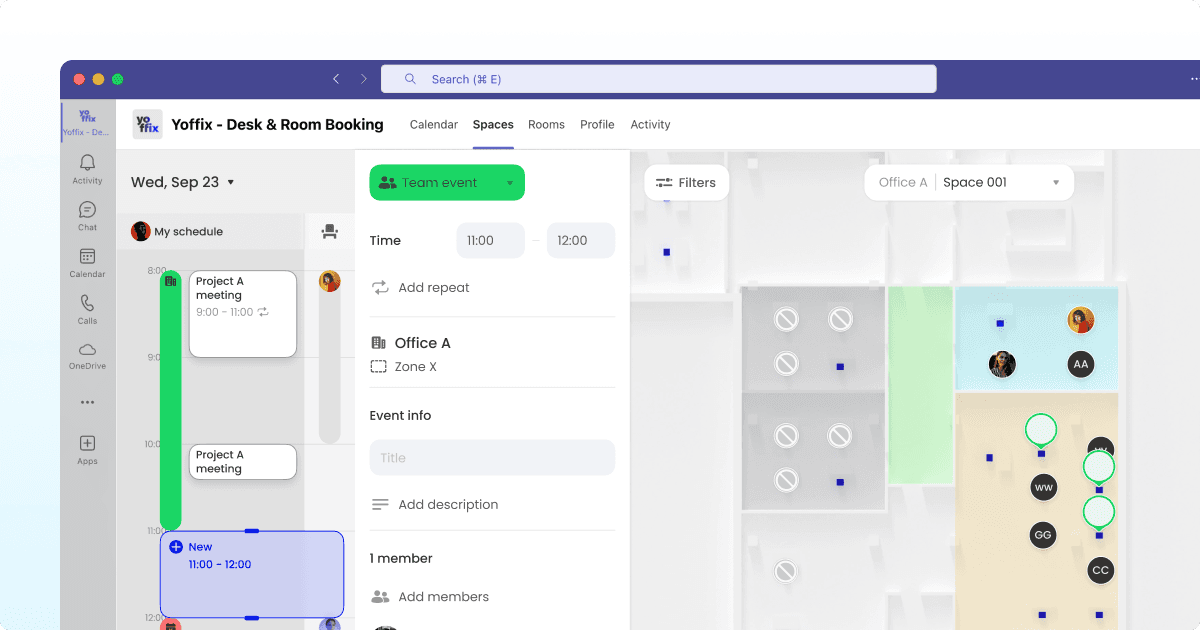
Yoffix is a Microsoft 365-native hybrid workplace orchestration platform for mid-sized companies, built for 500 to 5,000 employees. Employees book desks inside Microsoft Teams, bookings sync two-way with the Outlook calendar, and sign-in runs through Microsoft Entra ID. There is no separate portal and no second password.
Where most tools stop at the booking, Yoffix treats the attendance and usage data as the point. It connects desk booking with team coordination, so people come in on the days their colleagues do, and it expands into room booking, parking, resources, visitor management, and tickets in the same Teams interface.
Deep Microsoft 365 Integration
Fully embedded Microsoft Teams app without requiring separate portals or logins
Outstanding mobile experience within Microsoft Teams
Two-way Outlook calendar sync ensures bookings appear automatically in both systems
Azure AD (Microsoft Entra ID) integration for single sign-on and identity management
Native alignment with Microsoft security and compliance frameworks
Proven User Satisfaction
Rated 4.8/5 stars on Capterra (view reviews)
Listed on Microsoft AppSource and available through Microsoft commercial marketplace
Consistently high marks for ease of use and integration quality
Flexible Policy Management
Centralized hybrid policy controls without custom development
Configure office-specific or team-specific booking rules in minutes
Support for works council requirements in DACH region
Automatic check-in enforcement and no-show desk release
Real-Time Coordination
Live desk availability and interactive floor plans
Resource visibility shows which teammates plan to be in office
Instant calendar synchronization prevents booking conflicts
Mobile-optimized for on-the-go booking decisions
Strategic Analytics
Space utilization metrics and occupancy trends
Team presence data for hybrid policy optimization
Integration with occupancy sensors for validated usage data
WIFI-based presence measurement for utilization data, access systems integration
Stakeholder-accessible reporting (HR, workplace teams, finance)
Platform Scalability
Modular expansion to meeting room booking, visitor management, and resource booking
From €1.50 per user per month
All functions unified in the same Microsoft Teams interface
Integrates with popular HRIS platforms (BambooHR, Workday, Hibob, Personio, etc), occupancy sensors, access control systems, room displays, digital signage.
Available through Microsoft commercial marketplace
Eligible for Microsoft Azure Consumption Commitment (MACC)
Instead of operating as a standalone booking portal, Yoffix integrates into the daily Microsoft workflow, supporting both employees and administrators while reducing IT complexity and driving adoption rates 90% and above.
Pros:
Lowest published entry price in this comparison
Check-in, auto-release, and core analytics included rather than sold as add-ons
Broad module set in one platform, so rooms, parking, and visitors can be added later without a new vendor
German hosting and works council support for DACH buyers
Cons:
Built around Microsoft 365, so organizations fully standardized on Google Workspace get less depth
Enterprise space-planning features are lighter than a dedicated enterprise platform
A smaller, newer brand than Microsoft or the US incumbents
Best suited for mid-sized companies on Microsoft 365, 500 to 5,000 employees, that want to orchestrate hybrid work and turn attendance data into decisions about space, not just let people book a desk.
2. Microsoft Places
Source: Microsoft
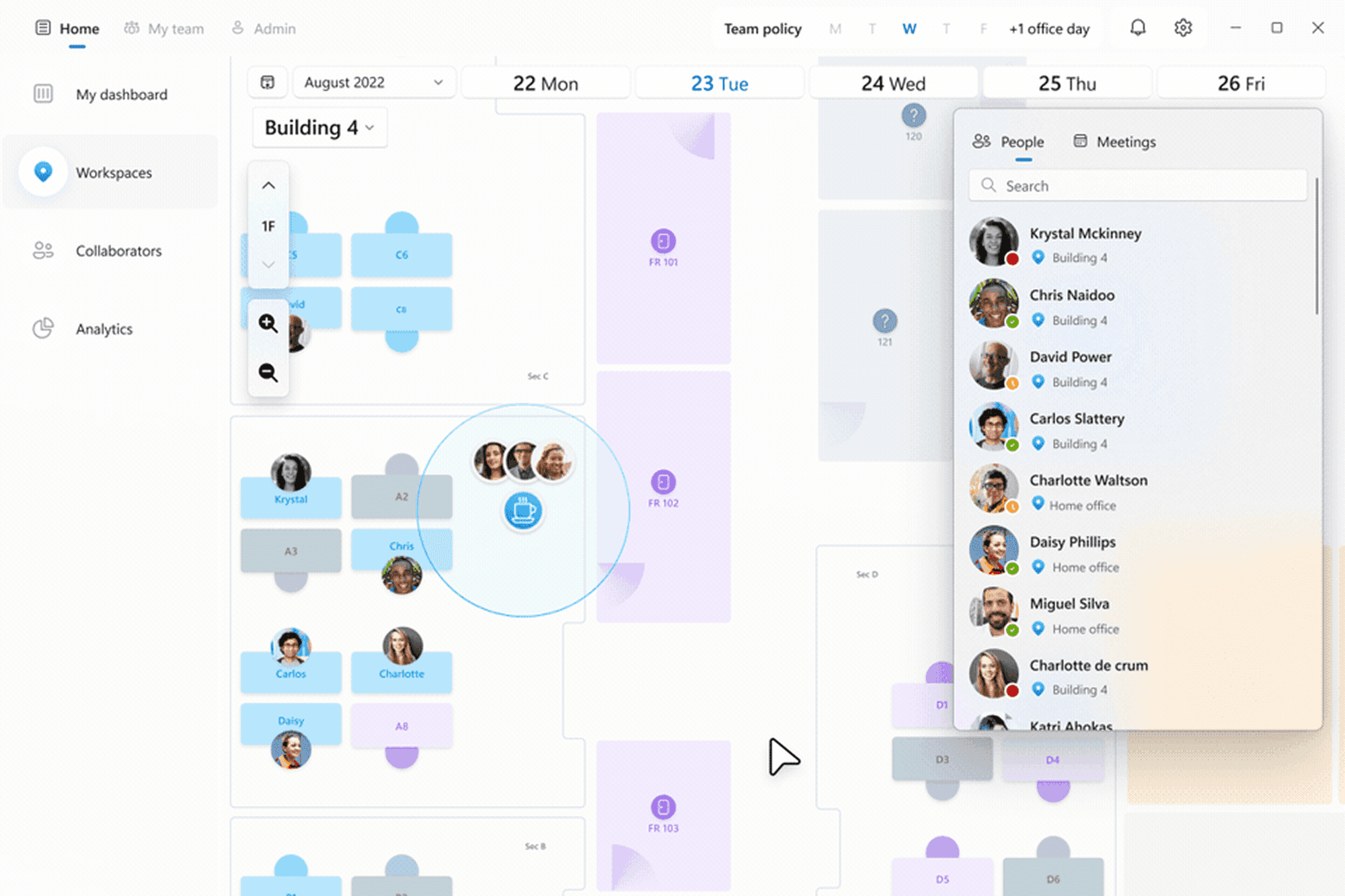
Microsoft Places is Microsoft’s native workplace coordination layer inside Microsoft 365. It adds presence visibility, work plans, and workplace check-in directly in Outlook and Teams, with no separate app to roll out.
Pooled desk booking is included in eligible Microsoft 365 plans, but individual named-desk booking, automatic release, and occupancy reporting now require a separate space license per desk. That distinction decides the real cost, because the native option stops being free at exactly the features most hybrid offices need.
Features:
Native Microsoft environment, configured through Exchange workspaces
Presence, work plans, and workplace check-in
Desk pools, drop-in, assigned, and reservable desks
Pooled desk booking included in eligible Microsoft 365 plans
Pros:
No new vendor or separate app
Uses existing Entra ID identity and Microsoft security
Pooled booking included for organizations with simple needs
Cons:
Individual desk booking, auto-release, and occupancy reports need a paid space license
Configuration runs through Exchange, so policy changes depend on IT
Limited support for team office days, per-team capacity caps, and zone-based access
No built-in visitor management or parking
Best suited for organizations seeking native Microsoft presence insights rather than a full workplace management platform.
Learn more about Microsoft Places alternatives.
3. deskbird
deskbird is a workplace management platform with a Microsoft Teams app, known for a clean interface and fast employee adoption. It covers desk, room, and parking booking, with visitor management and advanced features available as paid add-ons. Its data is hosted exclusively in the EU on Google Cloud, it holds ISO 27001 and SOC 2 Type 2.
Features:
Microsoft Teams app, Microsoft Entra ID SSO, and an Outlook add-in
SCIM provisioning available through a paid add-on
Desk, room, and parking booking, with visitor management as an add-on
EU-only hosting on Google Cloud, ISO 27001, SOC 2 Type 2, GDPR
From €2.75 per user per month
Pros:
Consumer-grade user interface
EU-only data hosting with SOC 2 Type 2
Works council readiness package for German and Austrian rollouts
Cons:
Higher entry price than the DACH-focused alternatives
SCIM provisioning and visitor management are paid add-ons
Advanced analytics sit on higher tiers
Best suited for companies that want a desk booking tool with strong employee adoption and are comfortable adding modules as paid extras.
4. Seatti
Seatti is a Microsoft 365-native workspace management tool. It combines booking for desks, rooms, and parking with a distinctive office intelligence module that measures real presence at desk level without sensors. The platform is sold as two modules, Workspace Management for daily booking and Office Intelligence for utilization data.
Features:
Native Microsoft Teams integration, Entra ID, and automatic user management
Desk, room, and parking booking, with visitor management as an add-on
Sensorless, IP-based presence measurement for utilization data
GDPR and works council compliant across all plans
From €1.90 per user per month
Pros:
Sensorless presence measurement for space decisions
Works council compliant on every tier at no extra cost
Competitive entry price for the DACH market
Cons:
Visitor management is an add-on
Full value often means buying both modules
Pricing and hosting detail are less transparent than some alternatives
Best suited for companies that want booking and real utilization measurement in one Microsoft-native system.
5. Robin
Robin is a US workplace platform built for larger enterprises, typically 500 employees and up with multiple floors or buildings. It covers desks, rooms, parking, lockers, visitors, and deliveries, with deep space-planning and analytics. It holds ISO 27001, SOC 2 Type II, and CSA STAR certification. Pricing is quote-based and billed annually.
Features:
Microsoft Teams and Outlook integration, Entra ID, and SCIM 2.0 provisioning
Desks, rooms, parking, lockers, visitors, and delivery management
Advanced space management, neighborhoods, and scenario planning
US or EU data residency, ISO 27001, SOC 2 Type II, CSA STAR
Pricing on request
Pros:
Deep enterprise analytics and space-planning tools
Broad platform that replaces several point solutions
Cons:
Quote-only pricing with annual billing
US company, with EU residency as an option rather than the default
Several analytics and services features are paid add-ons
Heavier than most mid-market offices need
Best suited for large enterprises managing complex, multi-building portfolios.
6. Kadence
Kadence is a UK workplace platform built around hybrid team coordination. Its WorkOps product covers desk, room, and visitor booking, with a focus on helping teams plan which days they come in together. It integrates with Microsoft Teams, supports SSO and directory sync, and connects to HRIS systems. Pricing is quote-based.
Features:
Microsoft Teams app with SSO and directory sync
Desk, room, and visitor booking, plus move management
HRIS integrations (Workday, BambooHR, HiBob)
SOC 2 and Cyber Essentials certified
Pricing on request
Pros:
Strong focus on team coordination and shared office days
HRIS integrations for user and absence sync
Teams-native experience
Cons:
Quote-only pricing
EU data residency is not stated (UK and US infrastructure)
Visitor management and some features sit on higher tiers
Best suited for companies whose main problem is coordinating when teams come in together.
7. Envoy
Source: Envoy
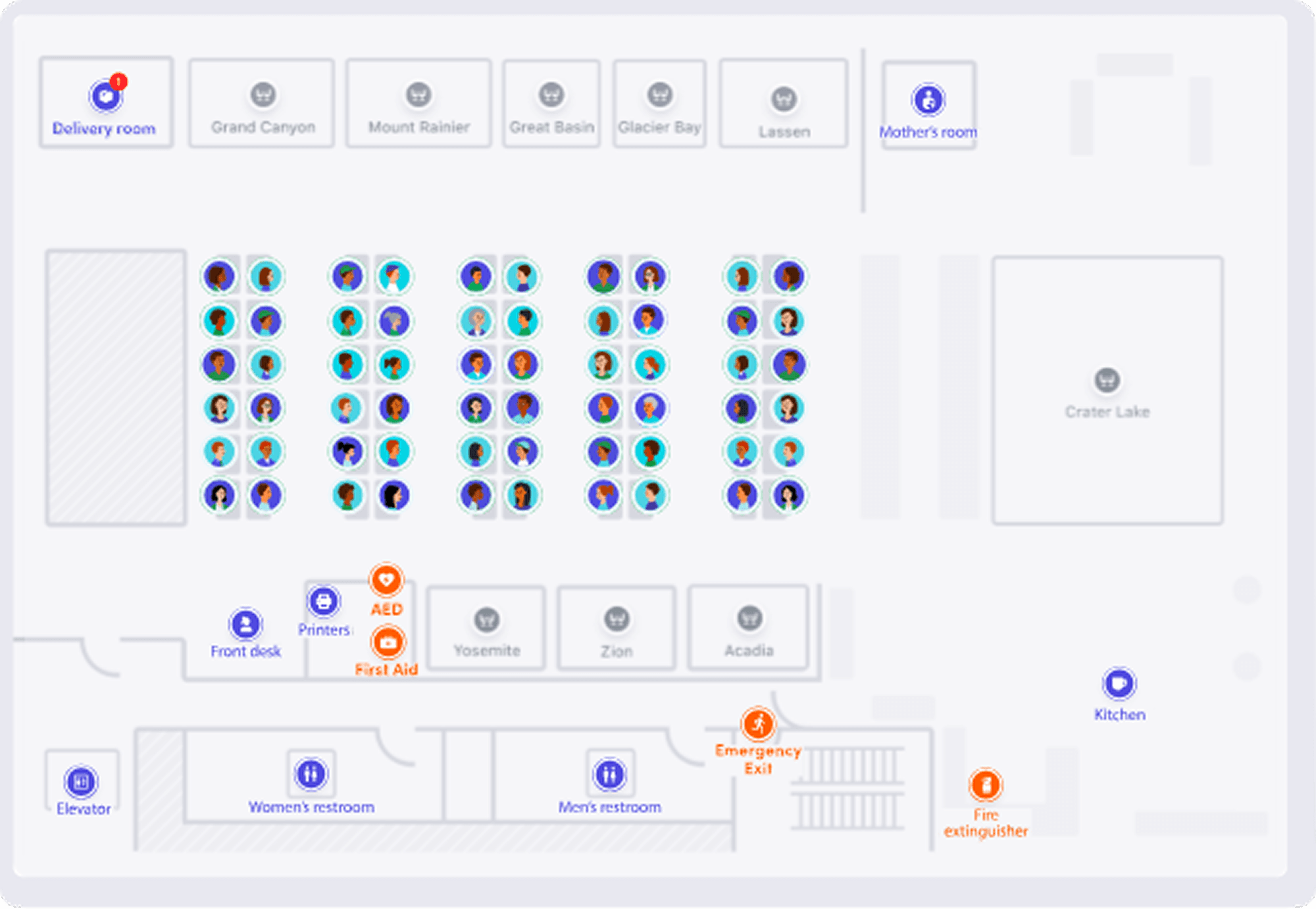
Envoy is widely known for visitor management and workplace services. It also offers desk booking with Microsoft Teams integration.
Strengths:
Strong visitor management capabilities
Enterprise positioning
Multi-feature workplace solution
Limitations:
Microsoft integration depth varies depending on configuration
Some workflows still require separate portal interaction
Higher complexity for organizations primarily seeking a Microsoft-native desk booking system
EU-based organizations may need to conduct additional review of data residency and cross-border transfer practices to ensure GDPR alignment.
Best suited for enterprises prioritizing visitor management with desk booking as an extension.
8. Waldo Booking
Source: Waldo
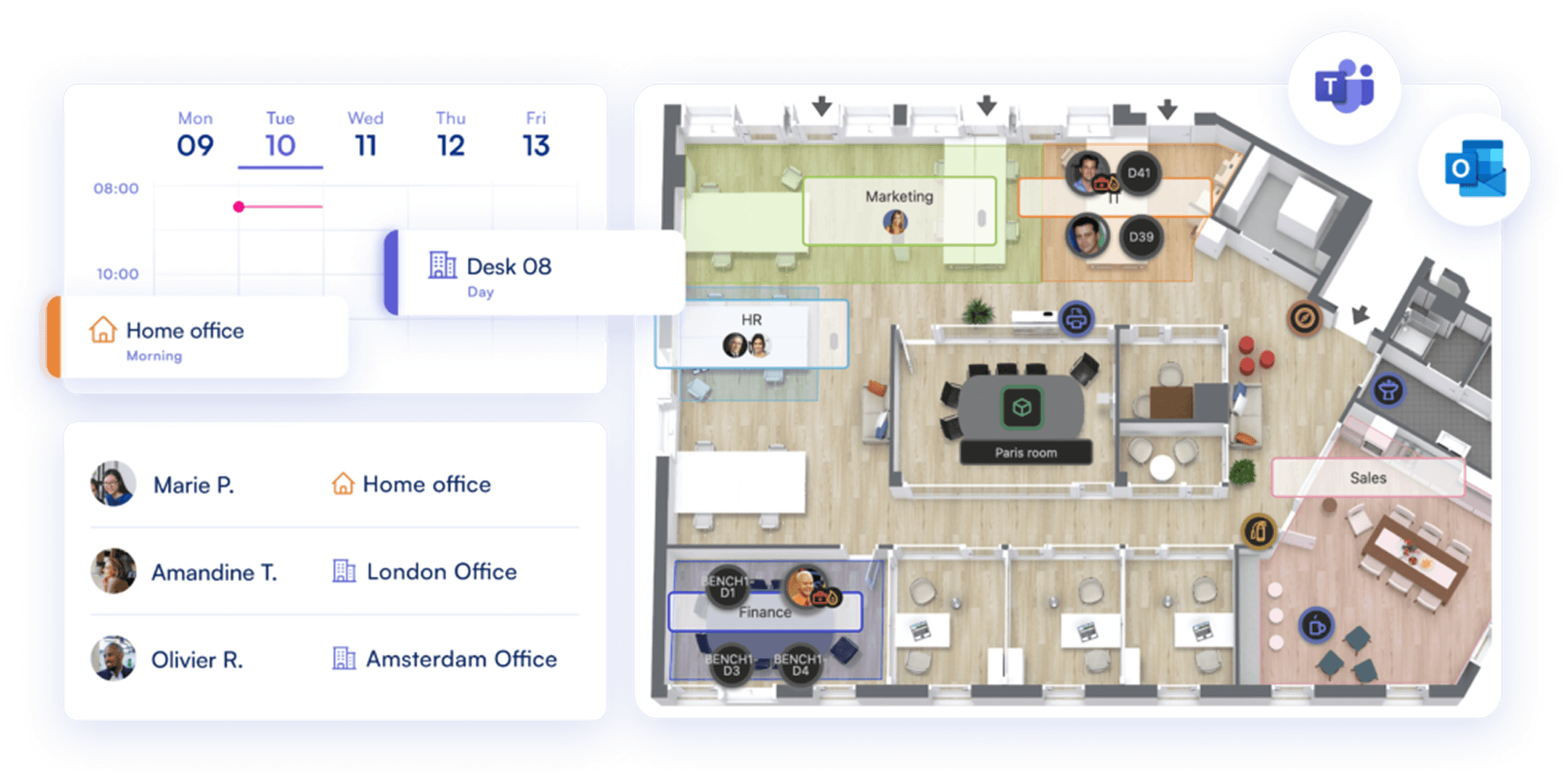
Waldo Booking provides desk and meeting room reservations with Microsoft Teams integration and interactive floor plan support. The solution emphasizes usability and fast implementation.
Strengths:
Microsoft Teams integration with desk and parking space booking
Interactive floor plans and real-time availability
Quick deployment
Limitations:
Limited governance and hybrid policy customization for complex environments
Analytics and reporting capabilities are less comprehensive than enterprise workplace platforms
Best suited for companies prioritizing fast implementation and basic booking functionality.
9. Desk.ly
Source: Desk.ly
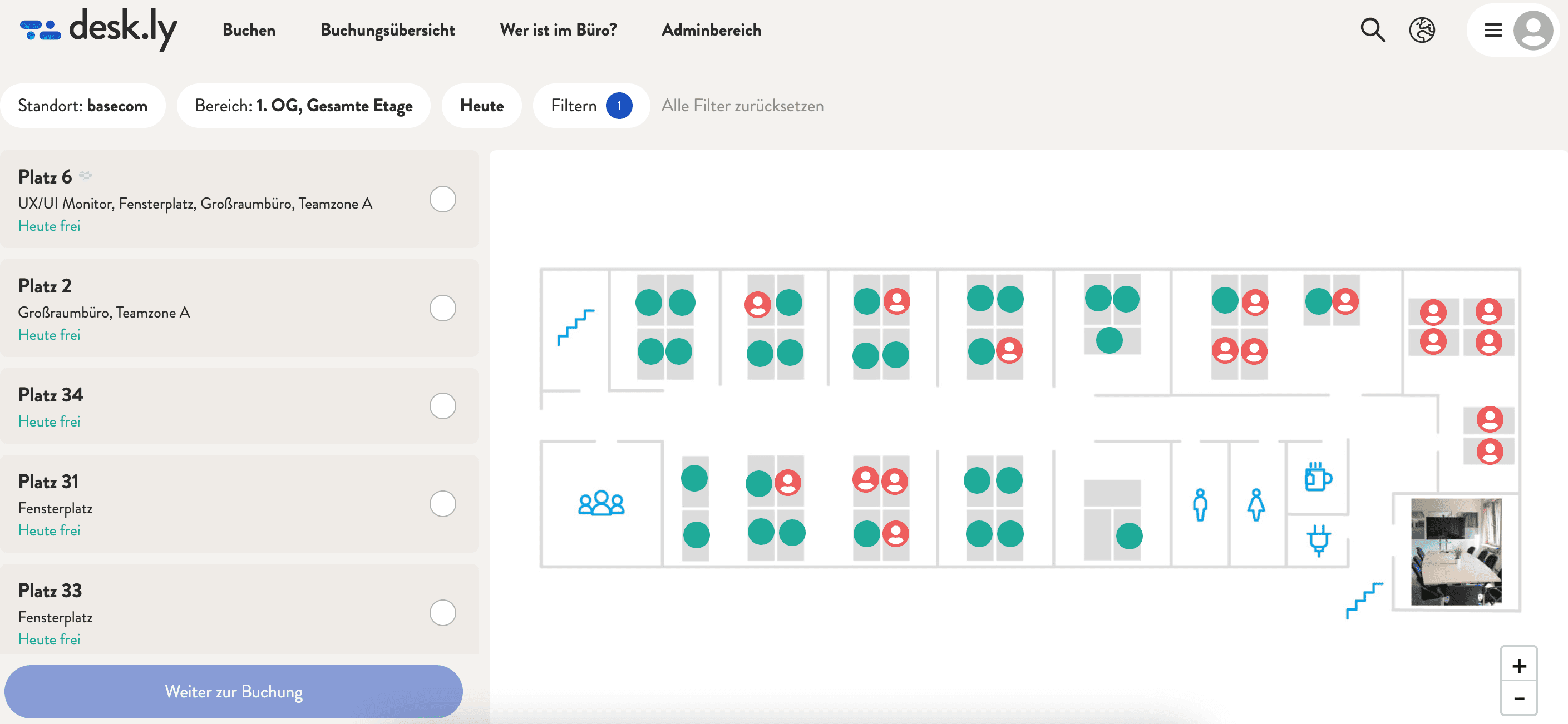
Deskly provides a solid desk booking system with Microsoft Teams integration and focuses on a clean, easy-to-use reservation experience. It works well for organizations introducing flexible seating and looking for straightforward booking functionality inside Microsoft 365.
Strengths:
Microsoft Teams integration with Outlook calendar sync
Interactive floor plans and real-time availability
Simple setup and intuitive booking flow
Limitations:
Limited flexibility for complex hybrid policies across multiple offices or departments
Basic governance and rule configuration compared to enterprise-focused platforms
Not designed as an all-in-one workplace management platform (no unified expansion into visitor management, advanced analytics, or broader hybrid coordination modules)
Best suited for small to mid-sized teams needing simple desk booking inside Teams.
Which tool is best for your company?
Choose Microsoft Places if pooled desk booking is enough, desk supply comfortably exceeds demand, and IT is willing to own configuration in Exchange and pay space licenses for individual desks.
Choose Yoffix if you have 500 to 5,000 employees and want to orchestrate hybrid work, not just hand out desks: coordinate who comes in on which day, run zones and team rules rather than plain reservations, let workplace or HR teams change policy without an IT ticket, and turn attendance data into decisions about space. Native to Microsoft 365, and ready to add rooms, parking, or visitors when you need them.
Choose deskbird if intuitive UX and interface polish are the priority and you are comfortable adding SCIM and visitor management as paid extras.
Choose Seatti if you want booking and real utilization measurement together, and works council compliance on every tier matters.
Choose Robin if you run a large, multi-building portfolio and need enterprise-grade analytics and space planning.
Choose Kadence if coordinating shared team days is the main problem you are solving.
Choose Envoy if visitor volume is your main problem and desk booking is secondary.
Choose desk.ly if you want a lightweight Teams booking tool with minimal setup.
Choose Waldo or desk.ly if you want a lightweight Teams booking tool with minimal setup and no complex policy requirements.
Making the Right Choice
If your organization runs on MS 365, your desk sharing software should integrate deeply into that ecosystem. When evaluating solutions, prioritize integration depth, real-time reliability, policy enforcement, security alignment, administrative scalability, and workplace analytics.
Desk sharing isn't just about reserving a seat but about coordinating hybrid work at scale, securely, efficiently, and with measurable impact. For organizations with 500+ employees and structured hybrid policies, a Microsoft-native platform approach typically delivers stronger adoption, lower IT complexity, and better long-term workplace optimization.
Choose a solution that lives where employees already work, enforces policies automatically, provides strategic insights, and can evolve as your hybrid work strategy matures. That's how desk sharing software becomes workplace infrastructure rather than just another tool to manage.
Get a quote for your Microsoft 365 setup
Frequently Asked Questions
Which desk booking software is best for a company in Germany on Microsoft 365?
For a German company on Microsoft 365, the shortlist usually comes down to Microsoft Places against one DACH-ready workplace platform. The deciding factors are EU or German hosting, works council compatibility, Microsoft Entra ID sign-in, and a booking experience inside Teams. Several platforms meet these criteria, including Yoffix, Seatti, and deskbird. Yoffix is hosted in Germany, is ISO 27001 certified and works council configurable, runs inside Microsoft Teams, and starts at €1.50 per user per month.
Does Microsoft Teams have built-in desk booking?
Yes, through Microsoft Places. Employees can book desk pools and individually named desks from Teams and Outlook, and desks can be set as reservable, drop-in, assigned, or unavailable. Pooled booking is included in Microsoft 365 plans. Individual desk booking, automatic release, and occupancy reporting are paid add-ons.
What does a native Teams integration actually mean?
A native integration means employees complete the whole task inside Teams, without opening a web portal. Test it by booking a desk in Teams and checking whether it appears in Outlook automatically, whether you can cancel it from Outlook, and whether the floor plan opens inside Teams. A bot that posts a link to an external booking site is a notification, not an integration.
Can desk booking software be purchased through Microsoft marketplace?
Some vendors are listed on the Microsoft commercial marketplace, which means the subscription is billed through your existing Microsoft account rather than as a separate vendor contract. Solutions that qualify for Microsoft Azure Consumption Commitment let you apply committed Azure spend to the purchase. For organizations with layered procurement approval, this can shorten deployment timelines considerably.
Does desk booking software sync users automatically from Microsoft Entra ID?
Well-integrated platforms authenticate through Microsoft Entra ID, so employees sign in with their existing company credentials. The stronger ones also support SCIM provisioning, which creates, updates, and deactivates users automatically when their directory entry changes, and removes access the moment an account is disabled. Yoffix supports Entra ID single sign-on on all plans and SCIM provisioning on Pro and Enterprise. Without automatic provisioning, offboarded employees can keep access to booking data.
What is the difference between Microsoft Places and a third-party desk booking tool?
Microsoft Places is native to Microsoft 365 and includes pooled desk booking in eligible plans, with configuration handled through Exchange. Since April 2026, individual named-desk booking, automatic release, and occupancy reporting require a separate space license per desk. Third-party platforms add zone and team rules, team office days, deeper analytics, visitor management, and parking, and they let workplace or HR teams change policy without IT. The usual decision is whether pooled booking is enough, or whether you need per-team rules and reporting.
How much does desk booking software for Microsoft 365 cost?
Per-user pricing typically ranges from €1.50 to €3 or more per user per month, depending on features and company size. Yoffix starts at €1.50 per user per month, Seatti at €1.90, and deskbird at €2.75. Microsoft Places uses your existing Microsoft 365 license for pooled booking, plus a space license per individual desk. Enterprise platforms like Robin and Kadence price on request.
Is Yoffix or deskbird better for Microsoft 365?
Both run inside Microsoft Teams, host data in the EU, and support works council requirements, so the choice comes down to priorities. Yoffix starts at €1.50 per user per month and includes check-in, auto-release, core analytics, and SCIM provisioning (on Pro and Enterprise) in the plan. deskbird starts at €2.75 per user per month, is known for its interface and adoption, and offers SCIM and visitor management as paid add-ons. Yoffix hosts specifically in Germany, while deskbird hosts across the EU on Google Cloud.


