Yoffix brings desk booking, room booking, and parking into Microsoft Teams and Outlook, with Entra ID sign-in, calendar sync, and utilization data for IT, HR, and workplace teams. Built for companies of 100 to 5,000 employees and several offices.
Certified Microsoft Partner
ISO 27001:2022 certified
Hosted in Germany






Yoffix runs inside Microsoft 365
Desk booking in Teams
Hot desking, assigned desks, and neighborhoods, booked from the floor plan in Teams.
Room booking in Teams
Find a room, attach a Teams link, and invite attendees in one flow.
Parking and resources
Reserve a parking space, a locker, or shared equipment in the same app.
Outlook calendar sync
Two-way sync, so desk and room bookings land in the employee's calendar.
Exchange room sync
Room availability stays aligned with Exchange, so nothing is booked twice.
Outlook add-in
Book a meeting room from Outlook without opening the Yoffix app.
Entra ID sign-in
Single sign-on and automatic user sync through Microsoft Entra ID.
Teams notifications
Check-in reminders, booking changes, and visitor alerts arrive in Teams.
Visitor management
Invite and check in visitors from Teams and Outlook, with instant host alerts.
Identity and rollout

Roll out without creating new accounts
IT carries the cost of every tool that brings its own login. Yoffix signs employees in through Microsoft Entra ID and syncs the directory, so joiners, movers, and leavers are handled where they are already handled. There is no extra password to reset.
Single sign-on via Entra ID, Okta, OneLogin, or SAML
User sync from Entra ID or SCIM, with automatic offboarding
Custom roles and granular permissions per office
20+ HRIS integrations if employee data sits outside Entra ID
Daily ease of use

Employees book where they already work
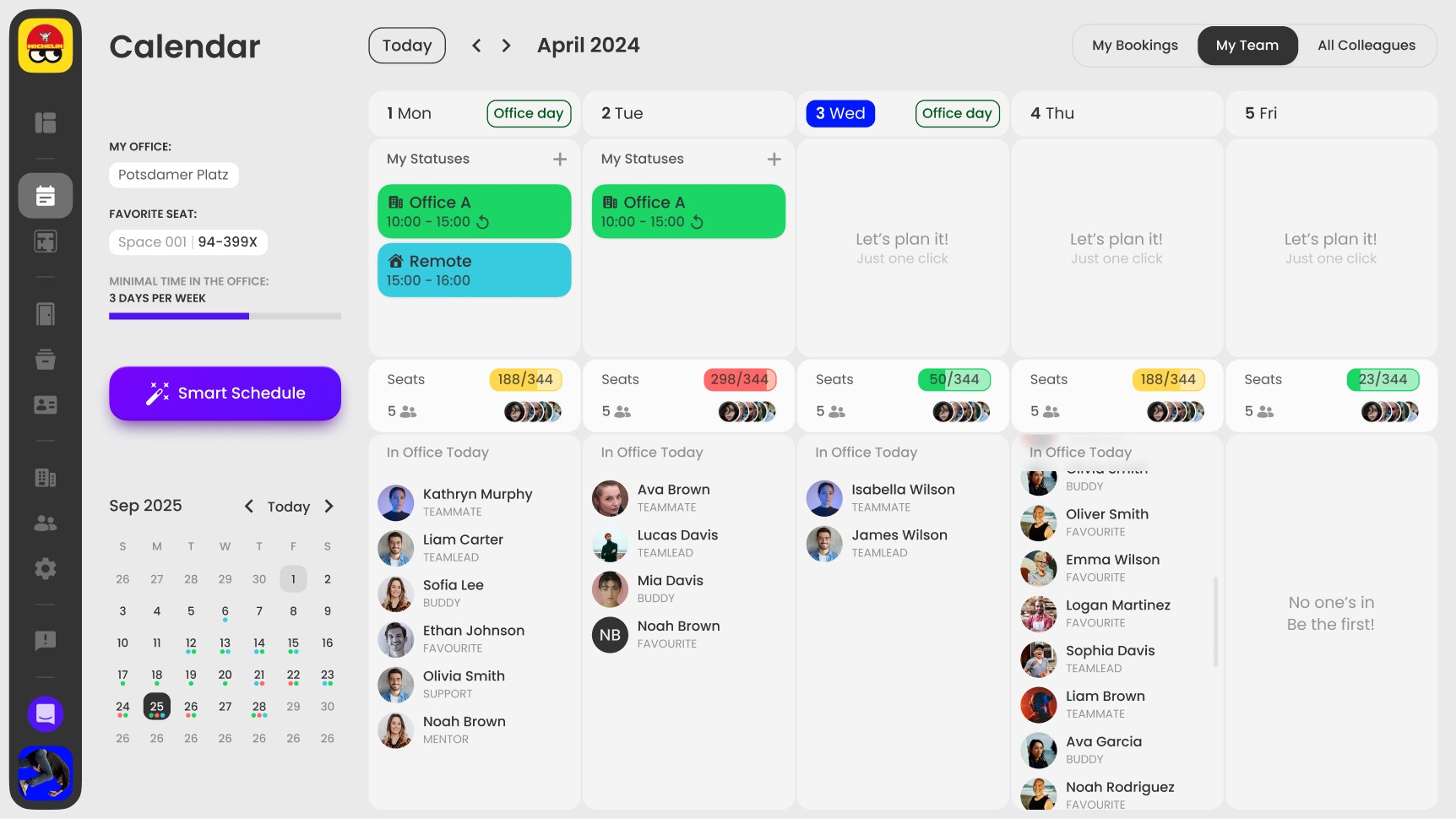
Desk booking projects fail on adoption, and the reason is usually the same: nobody opens a second app to reserve a desk. Yoffix sits in the Teams sidebar, so booking takes one tap from the calendar view, and the floor plan shows live availability for the date you pick.
One-click booking of a favorite desk from Teams
Filter the floor plan by neighborhood, equipment, or occupancy
Add a parking space or meeting room to the same booking
Check-in reminders in Teams, auto-release for no-shows
Outlook and Exchange

Calendars and floor plans stay in step
When bookings live in one system and calendars in another, the floor plan stops being trustworthy within a week. Yoffix syncs both ways with Outlook Calendar and keeps meeting rooms aligned with Exchange, so what people see in Teams matches what is actually reserved.
Two-way sync with Outlook Calendar for desks and rooms
Microsoft Exchange room sync prevents double bookings
Book rooms from the Outlook add-in without switching apps
The floor plan timeline shows the employee's Outlook events
Yoffix vs Microsoft Places
Places is Microsoft's own workplace platform, and individual desk booking there is a premium feature that needs desks backed by a space license. The split below is where most evaluations land.
Microsoft Places covers
Desk booking in Teams, Outlook, and Places
Reservable, drop-in, and assigned desks
Buildings, floors, and sections you configure
One platform, no extra vendor to onboard
Included with eligible Microsoft 365 plans
Places fits when you have one office, simple booking rules, and no utilization data to report.
Companies pick Yoffix for
Utilization by floor, team, and weekday
Anchor days and minimum office days per team
Desks, rooms, parking, resources, visitors
Interactive 2D and 3D floor plans you upload and edit
User and absence sync from your HR system
Yoffix fits when you have a hybrid policy to enforce, utilization to report, or rooms and parking to run.
What you get on top of Microsoft 365
Microsoft 365 gives employees an interface they know. Deciding how much office you need, and who uses it, takes data Microsoft does not collect.
Office utilization data
The dashboard shows utilization by floor, by day of the week, and by team, with attendance patterns over any period. Customers use it to scale down or repurpose space, saving up to 30 to 50%.
Hybrid policy that holds
Set minimum office days and anchor days per team, then track compliance per team in the dashboard. Managers create team office days, and Yoffix assigns the desks and notifies everyone involved.
Works council-ready privacy
Anonymous mode aggregates attendance in reports and the dashboard, showing trends without identifying individuals. Per-employee privacy settings control who can see whose attendance.
Save time and minimize risks with enterprise-grade security
Yoffix is a German company hosting customer data in Germany, with the documentation IT, legal, and procurement ask for available before the first call.

Whether you are preparing for an internal audit, responding to a regulator, or simply protecting sensitive building access data, Yoffix gives you the controls and the documentation to back it up.

Award-winning workplace management app




4.8
4.8
See Yoffix running seamlessly in Microsoft 365
Book a 30-minute demo and see desk booking, Outlook sync, and Entra ID sign-in.
Flexible and transparent pricing

from
€1.5
Per user per month
Pay for what you need
Bulk discounts
Get a custom quote for your workplace
Every office is different. Tell us about your setup – the number of users, the features you need, or any other special requirements. We'll send you a tailored proposal with pricing, implementation timeline, and answers to your questions.
Response within 24 hours
Custom pricing based on your needs
No obligation


