Desk Booking & Workplace Management Platform for Personio Users
If your HR team already runs on Personio, Yoffix is the missing layer between your HR data and your physical workplace. Yoffix's Desk Sharing for Personio automatically syncs employee profiles, team structures, and absence statuses so your desk sharing, room booking, parking management, and hybrid attendance always reflect real HR data — no manual updates, no double data entry, no wasted desks.
"The ability to interface seamlessly with Personio is key to streamline HR workflows for our joint customers." — Hugues Vincent, Head of Product Partnerships at Personio
What the Personio Integration Does
Once connected, Yoffix will:
Import employee profiles (name, email, department, position) from Personio automatically
Sync absence statuses in real time — vacation, sick leave, parental leave, and more
Reflect employee availability instantly in desk booking, room scheduling, and attendance views
Automatically onboard new employees added in Personio
Optionally sync office bookings from Yoffix back to Personio
This keeps your hybrid office planning, team coordination, and attendance management permanently aligned with your HR records.
How to Connect Personio with Yoffix
Setup takes a few minutes and requires no IT involvement.
1. Log in to Yoffix as an admin Go to app.yoffix.com and log in with your admin account.
2. Navigate to the Personio integration Click: Profile icon → Settings → Integrations → User Sync → Personio

3. Generate API credentials in Personio In your Personio account:
Go to Settings → API → Credentials and click Generate new credentials.

Name the credential (e.g. "Yoffix Integration") and select Yoffix from the integration list.

Click Generate new credential.

Scroll down, copy and paste Client ID and Client Secret into the appropriate fields in Yoffix.

Click Connect.
You'll see a confirmation once the connection is active and data sync has started.
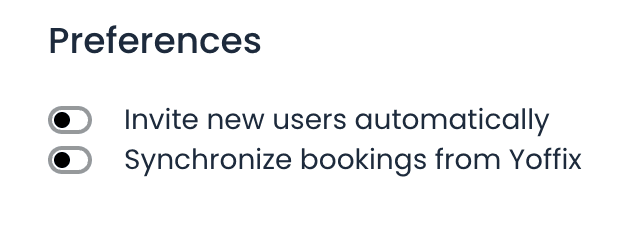
Optional: Enable booking sync from Yoffix to Personio By default, sync runs from Personio to Yoffix only. To also send desk bookings and office attendance data from Yoffix back to Personio: Go to Preferences → Enable "Synchronize bookings from Yoffix".
Account activation for invited employees
Employees provisioned from Personio start in an invited state. When they sign in for the first time through SSO, Yoffix moves them to a registered state automatically, so they can book straight away without a separate activation step. Anyone who was stuck in an invited state before this change is resolved by their next SSO sign-in.
What Data Is Synced
Employee data
Name, email address
Department and team
Position
Profile photo (optional)
Absence data
Vacation and paid time off
Sick leave
Remote work / offsite work
Parental leave and maternity protection
Other time-off types
All data syncs automatically on an ongoing basis. New employees added in Personio are provisioned in Yoffix without any manual step.
Absence Status Mapping
Personio is the primary source of truth for employee availability. When an absence is recorded in Personio, Yoffix overrides any conflicting manual booking to keep data consistent.
Personio Status | Yoffix Status |
|---|---|
paid_vacation | Not available (Vacation) |
offsite_work | Remote |
sick_leave | Not available (Sick leave) |
maternity_protection_period | Not available |
parental_leave | Not available |
other_time_off_statuses | Not available |
This prevents incorrect desk reservations and ensures hybrid attendance data is always accurate.
Why Connect Personio with Yoffix?
No wasted desks — absent employees are automatically removed from the booking pool
Automated onboarding — new hires appear in Yoffix the moment they're added in Personio
No manual attendance adjustments — absence data flows through without admin intervention
HR-compliant hybrid reporting — attendance and utilization data is always grounded in official HR records
GDPR-compliant — all data is processed and stored within the EU; the integration is built on Personio's official API and is ISO 27001-aligned
Troubleshooting
Sync didn't start after connecting
Double-check that the Client ID and Client Secret were entered correctly
Verify that the API credentials in Personio have the correct permissions enabled
Confirm the integration is active under Settings → Integrations in Yoffix
Employee data isn't updating
Check that the employee record is complete in Personio (name and email are required)
Allow a few minutes for the initial sync to complete after first connecting
Absences aren't reflecting in Yoffix
Confirm the absence type is mapped in Personio and is not excluded from API access
Check that the integration has absence sync enabled (not just employee sync)
Need help? Contact us at support@yoffix.com — our team typically responds within one business day.
Frequently Asked Questions
Does Personio integrate with desk booking software?
Yes. Yoffix integrates natively with Personio and supports automated desk sharing, room booking, absence-based availability, and hybrid attendance management — all driven by your Personio HR data in real time.
What data syncs between Personio and Yoffix?
Yoffix automatically imports employee profiles, team structures, and absence data (vacation, sick leave, remote work, parental leave, and other time-off types) from Personio. Optionally, desk bookings and office attendance can also sync from Yoffix back to Personio.
How long does it take to set up the Personio–Yoffix integration?
Setup takes a few minutes. Generate API credentials in Personio, paste them into Yoffix, and your data starts syncing immediately. No IT work or custom configuration required.
Is the Personio–Yoffix integration GDPR-compliant?
Yes. The integration uses Personio's official API, transfers data over encrypted connections, and stores all data within the EU. Yoffix is ISO 27001-aligned and fully GDPR-compliant.
What happens when a new employee is added in Personio?
New employees are automatically provisioned in Yoffix — no manual import needed. They receive an invitation to activate their Yoffix account and can immediately start booking desks and rooms.