How to set a favorite desk in Yoffix
If your office uses shared desks but you have a preferred spot, you can mark it as your favorite in Yoffix. When you book an office day without manually choosing a desk, the system will try to reserve it for you automatically.
How to set your favorite desk
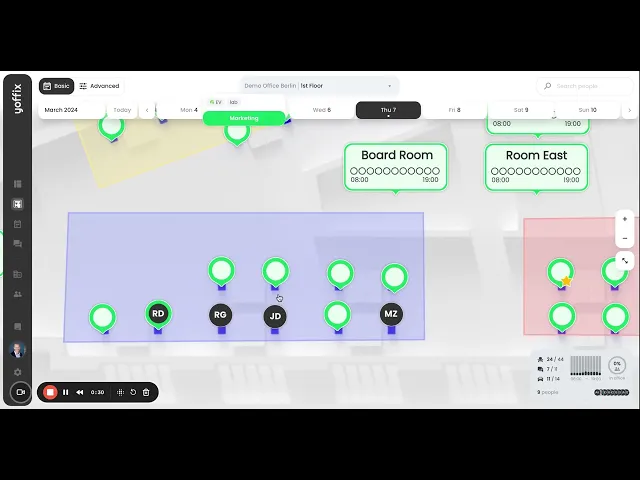
Open My office and browse the floor plan.
Hover over the desk you want to mark as your favorite.
Click the star icon that appears on the desk.
Your favorite is now saved. You can update it at any time by clicking the star on a different desk.
How it works
When you book an office day without selecting a desk manually, Yoffix works through a priority list to find the best available option for you.
Your favorite desk comes first. If it's free and you're permitted to use it, Yoffix books it automatically. If it's taken, the system checks whether you have a desk assigned directly to you, or one available through your department. If neither applies, it tries to keep you close to your preferred location by looking for a free desk in the same zone as your favorite, then in the same office.
When none of those options are available, Yoffix falls back to your booking history and tries to assign a desk you've used recently. As a last resort, it picks any free desk that matches your access permissions.
In other words, it follows this logic:
Your favorite desk
A desk assigned directly to you
A desk assigned to your department
A desk in the same zone as your favorite desk
A desk in the same office as your favorite desk
Any desk in your assigned office
A desk you've used before, or a nearby alternative
Any free desk that matches your access permissions
A desk is only booked if it's available on that date and within your allowed office, zone, and access rules.
If no favorite desk is set
Without a favorite desk, Yoffix looks at your recent booking history and tries to assign a desk you've used before, or a nearby alternative. If no desk from your history is available, it falls back to any free desk in your office.