>
>
Room booking used to mean reserving a calendar slot and hoping the room was actually free when you arrived. The category has moved on. The best room booking systems today manage the full meeting experience: from finding the right space and ordering catering to enforcing booking policies automatically, tracking real utilization, and using AI to help you make smarter decisions about how your space is used. Whether you're trying to cut down on ghost bookings, give facilities teams visibility over service requests, or understand which rooms are actually earning their floor space, the tools available in 2026 can do considerably more than their predecessors.
That shift matters because the gap between modern and legacy tools has widened considerably. Platforms built a few decades ago for large enterprise real estate teams were designed to be configured by IT and operated by facilities professionals. Many of them carry that complexity forward: long implementation timelines, high admin overhead, and pricing structures that don't fit how mid-sized companies actually buy software. Newer tools have been built from the ground up for the Microsoft 365 ecosystem, with a fundamentally different assumption about who sets up and maintains the system, and what a good employee experience actually looks like.
On top of that, the DACH market adds layers that most global tools aren't built for: stricter data protection law, works councils with real co-determination rights, and procurement teams that ask harder questions. This guide compares 7 solutions against the criteria that matter most, from day-to-day usability and the meeting experience to GDPR and works council readiness.
What Separates a Good Room Booking System from a Great One
Calendar and collaboration integrations
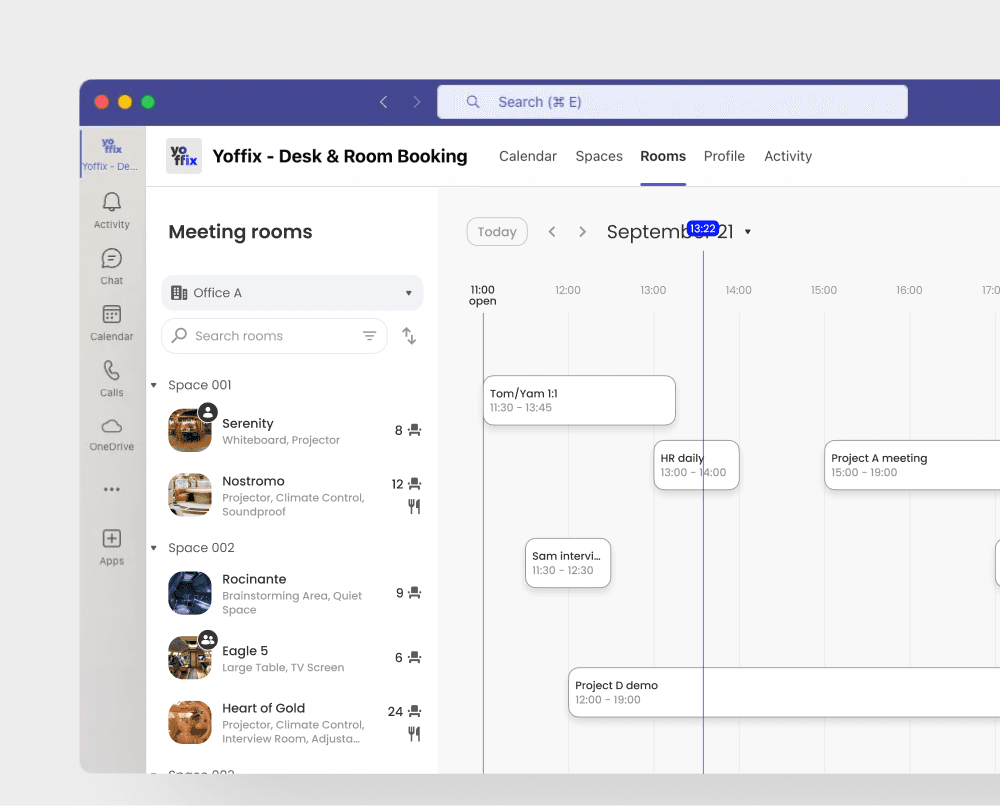
Two-way sync with Microsoft Outlook is a must. A room booked in the booking system should block the resource in Outlook immediately, and a meeting created in Outlook should reserve the room without extra steps.
An Outlook add-in that lets employees find and book rooms directly from their calendar, without opening a separate tool, removes one of the most common reasons people revert to emailing reception. For Microsoft 365 environments, booking natively inside Teams without switching apps makes a measurable difference in adoption. Many vendors offer "integration" that is one-directional, batched, or dependent on a web portal nobody uses. That is not the same thing.
Automated flows and booking rules
Manual approval processes and ad hoc exceptions are a sign that the tool isn't doing enough. The right system lets you configure how meeting rooms are accessed and managed without constant admin involvement.
That means: approval flows for premium or high-demand rooms, booking windows that prevent space being blocked weeks ahead, maximum meeting duration rules, room allocation to specific teams or departments, buffer times between bookings to allow for setup or cleaning, and built-in visitor invitation. The goal is a system that enforces your policies automatically so admins aren't spending time on individual requests, and so employees get a consistent, predictable experience.
Check-in and auto-release
Ghost bookings are one of the most common complaints in any office. Someone reserves a room, doesn't show up, and the space sits empty while others are turned away. Check-in enforcement with auto-release is the fix: if nobody checks in within a set window, the room is freed automatically.
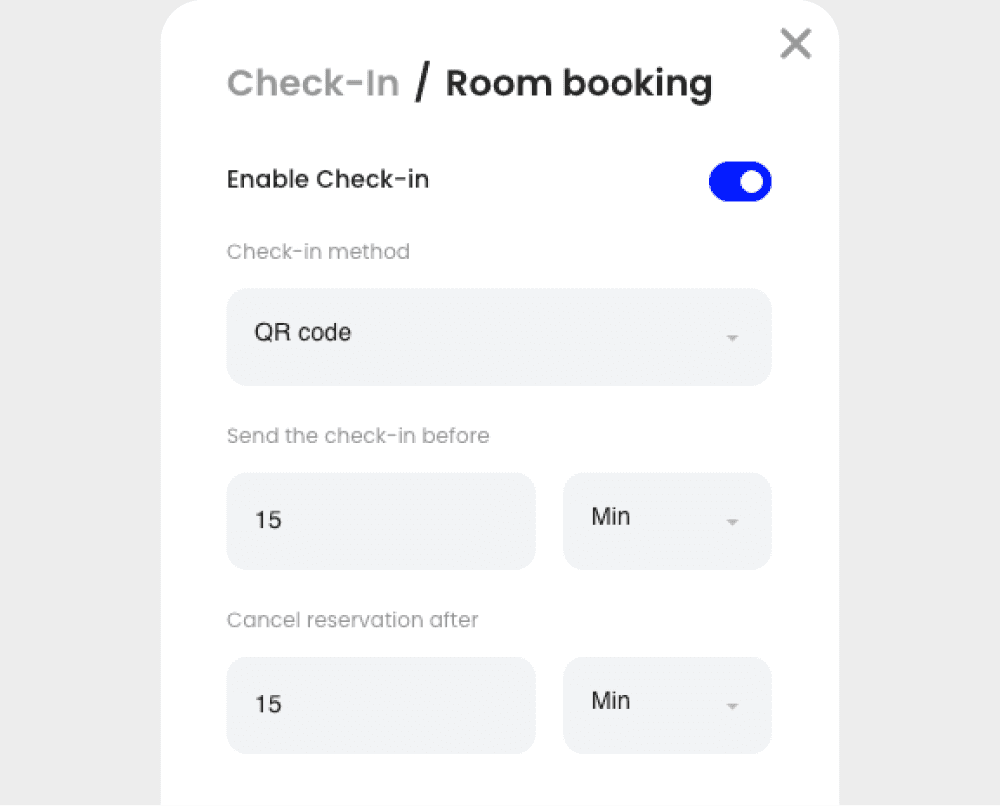
What differentiates tools here is the flexibility of the check-in mechanism: check-in via the Teams app, QR code, the room display app, and NFC chips. Controls on recurring reservations, which are the main culprit for long-term space hoarding, are equally important. A room blocked every Tuesday for a recurring meeting that stopped happening three months ago is a real problem in most offices.
Room attributes, filtering, and floor plans
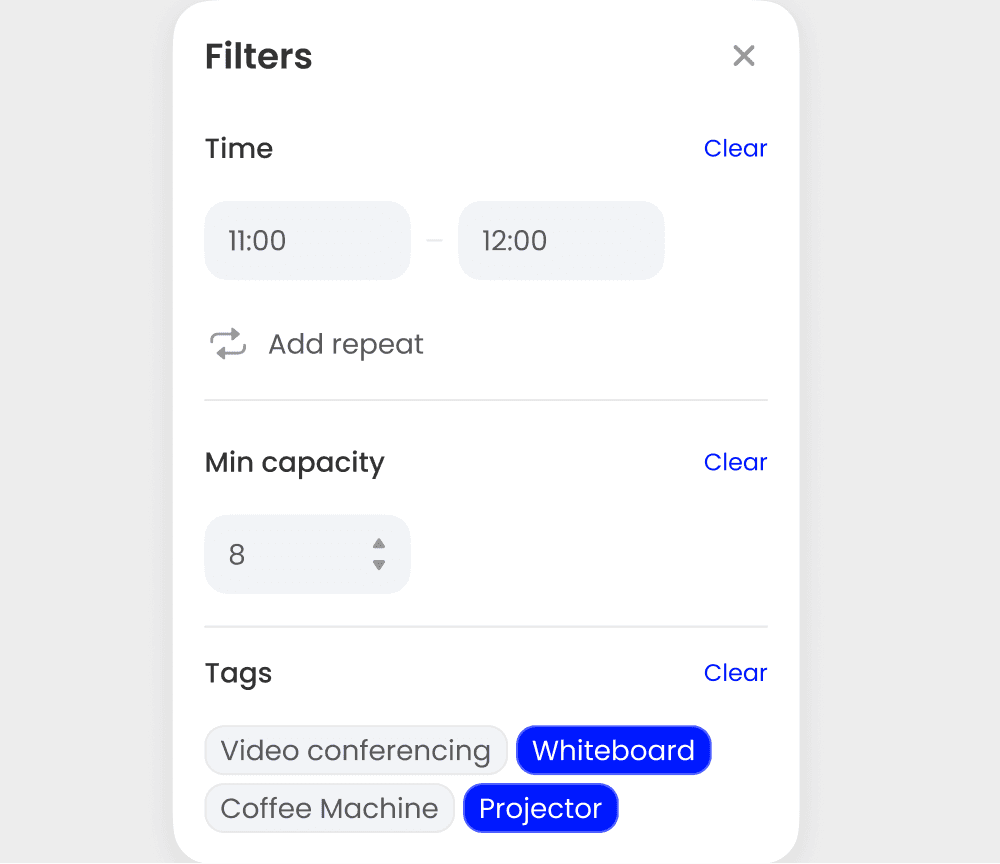
Available is not the same as suitable. Employees need to filter by capacity, AV equipment, seating layout, accessibility, and location on a floor, and trust that those attributes are accurate and up to date. Systems where room data is hard to maintain degrade over time: people stop trusting the filters and start calling reception instead.
Floor plan views and room photos help employees orient themselves before they arrive, which matters more in multi-floor or multi-building environments. Divisible rooms, where a large space can be split and booked as two smaller ones, are a feature worth checking if your office uses them.
Customized meeting experience
A room booking tool that only reserves a space misses half the job. Every meeting is different, and the booking step is the right moment to handle the logistics around it. Employees should be able to request catering, choose a seating arrangement, add equipment, invite external visitors, and link a cost center, all at the point of booking, without sending a separate email or opening another tool.
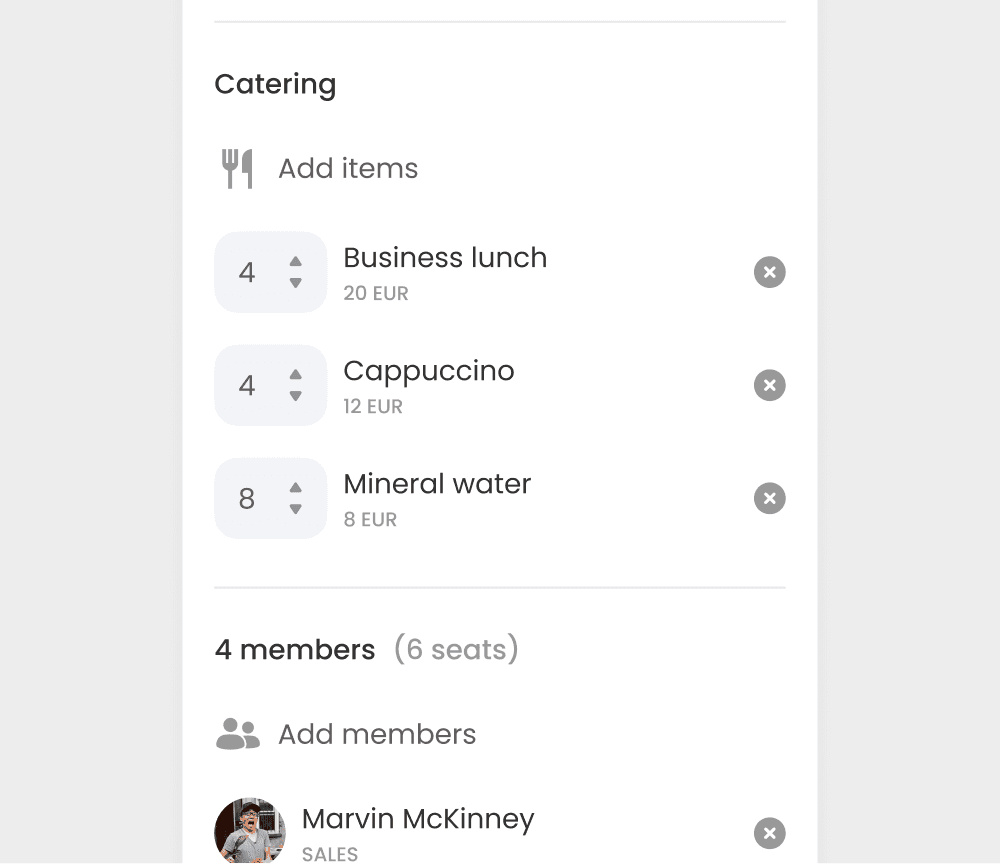
On the facilities side, this only works if office managers and FM teams have a consolidated view of all service requests coming in. A catering order placed in the booking system needs to reach the right person without anyone having to chase it down. If the tool doesn't connect the booking to the fulfillment workflow, the emails and back-and-forth it was supposed to replace just move somewhere else.
Analytics and AI-powered optimization
Reliable utilization data is where room booking shifts from an operational tool to a strategic one. Occupancy data supports decisions about space right-sizing, lease renewals, and floor plan changes. Look for reports covering actual occupancy versus booked capacity, peak usage patterns, no-show rates, and rooms that are consistently over- or under-booked.
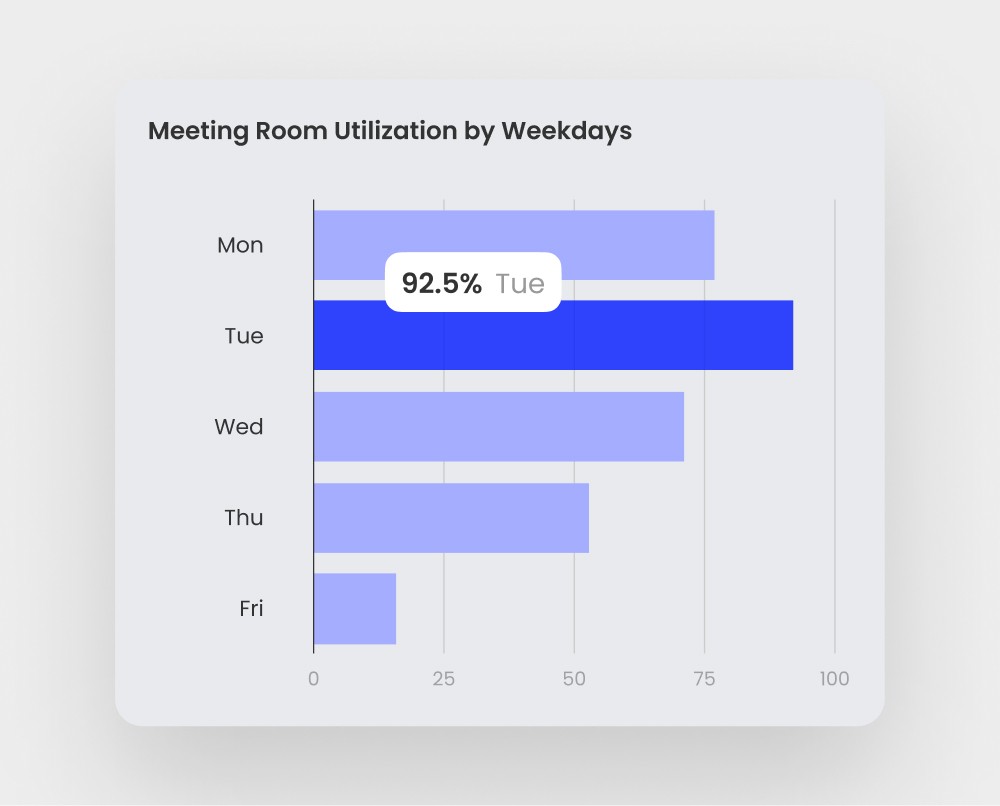
The more useful question is not just how often a room was booked, but how well it matched the meeting that happened in it. A six-person room used by two people twice a day is a different problem than a room that's always fully occupied. Good analytics surfaces both. From there, admins can make informed decisions: converting large underused rooms into smaller ones, adjusting the room mix across a floor, or setting maximum meeting duration rules to free up high-demand spaces during peak hours.
The best systems go further and prompt smarter decisions at the point of booking. If someone tries to reserve a twelve-person boardroom for a two-person call, the AI-powered system can flag it and suggest a better-fit room. If a smaller room is available that matches the meeting size, it surfaces that first. That kind of nudge, applied consistently across hundreds of bookings a week, shifts utilization patterns without requiring any policy enforcement from admins.
Analytics that require manual exports or are only accessible to admins lose most of this practical value. The goal is a system where the data improves both individual booking decisions and long-term space planning, without anyone having to chase a report to get there.
On-site experience and room displays
The gap between a booking system and physical reality is where most of the day-to-day frustration lives. Someone books a room in the app, arrives to find it occupied. Or walks past three empty rooms because they can't tell which ones are free. Room displays and digital signage close that gap.
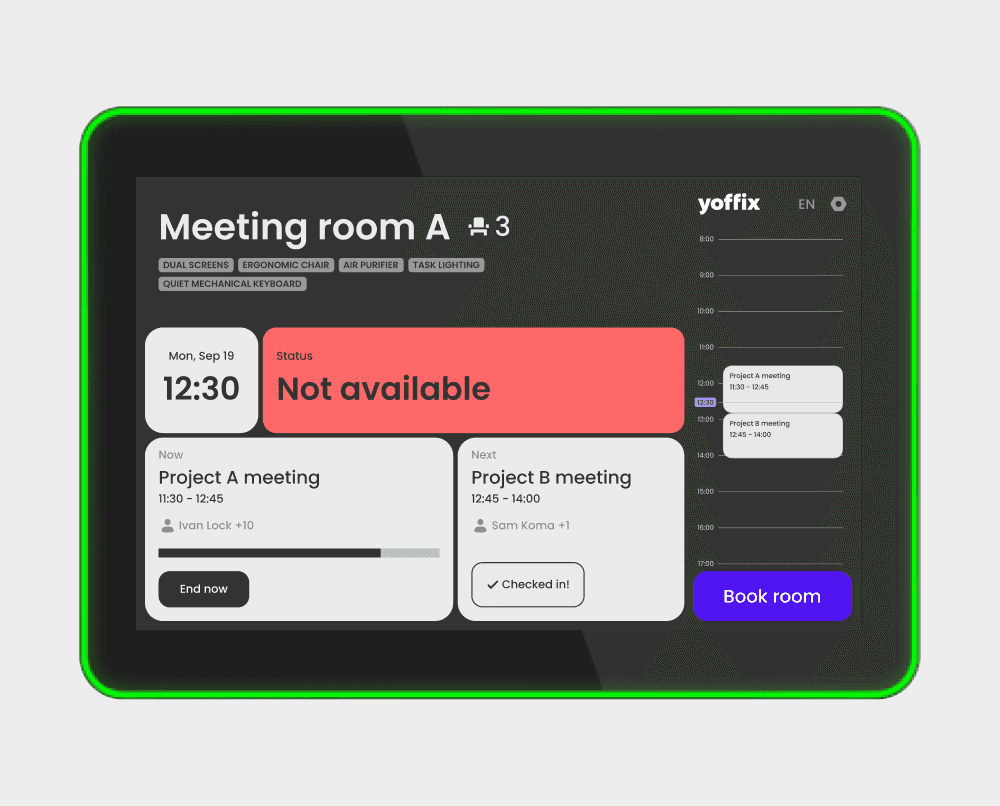
Digital panels outside meeting rooms show current and upcoming bookings, allow ad-hoc booking directly on the screen, and support check-in on the spot. These can be panel displays with LED status bars or wireless e-ink displays that require no wiring and run for over two years on a single charge. For offices without dedicated hardware budgets, any smart TV can display live room and desk availability via digital signage feature. Occupancy sensors extend this further by feeding real presence data back into the system automatically.
Scalability, admin controls, and pricing
If you operate across multiple offices, or may in future, the tool needs to handle separate locations, floor plans, time zones, and user groups without administrative burden multiplying linearly. Some tools work well for a single office and become painful to manage at three or four sites. Multi-tenancy support for organizations with separate Microsoft 365 tenants is a separate but related requirement worth checking early.
On pricing, per-room models are generally more predictable for room booking specifically, since the number of rooms is stable while headcount fluctuates which means organizations that only need room booking can start there without buying the full platform. Per-user models make more sense for full workplace platforms where every employee is an active user across multiple modules.
GDPR, data residency, and works council readiness
Most vendors claim GDPR compliance. The question is where data physically lives and who controls it. For example, for DACH companies, best practice means EU or DACH hosting, data minimization, and certifications such as ISO 27001. Room booking systems collect behavioral data, who was in the office, when, in which room, and for how long, which is exactly the kind of data that requires careful handling.
That same data also brings these systems into scope for works council consultation. Any technical system capable of monitoring individual employee behavior or performance may require works council co-determination before rollout. This doesn't prevent deployment, but it requires planning for it. Before purchasing, check whether the system's reporting can be scoped or anonymized to satisfy local regulations, and whether the vendor has navigated this process with EU customers before.
Feature Comparison at a Glance: 7 Meeting Room Booking Tools Side by Side
Tool | MS Teams app + Outlook Add-in | Booking rules & workflows | Check-in & auto- release | Filtering & attributes | Catering, equipment, seating options | Analytics | AI features | Room displays | Multi-tenancy | Per room pricing | EU data residency |
Yoffix | ✅ | ✅ | ✅ | ✅ | ✅ | ✅ | ✅ | ✅ | ✅ | ✅ | ✅ |
Joan | ❌ | ❌ | ✅ | ❌ | ❌ | ✅ | ❌ | ✅ | ✅ | ⚠️ | ✅ |
Condeco / Eptura | ✅ | ✅ | ✅ | ✅ | ❌ | ✅ | ✅ | ⚠️ | ⚠️ | ❌ | ❌ |
Skedda | ⚠️ | ✅ | ✅ | ✅ | ✅ | ✅ | ❌ | ✅ | ✅ | ✅ | ❌ |
Robin | ✅ | ⚠️ | ✅ | ✅ | ✅ | ✅ | ✅ | ✅ | ⚠️ | ⚠️ | ⚠️ |
desk.ly | ✅ | ❌ | ❌ | ✅ | ✅ | ✅ | ❌ | ✅ | ✅ | ❌ | ✅ |
anny | ✅ | ✅ | ✅ | ✅ | ✅ | ✅ | ❌ | ✅ | ✅ | ✅ | ✅ |
✅ confirmed · ⚠️ partial or unverified · ❌ not supported
Pricing from publicly available sources, March 2026. Verify with vendors before purchasing.
The 7 Best Meeting Room Booking Systems Reviewed
1. Yoffix
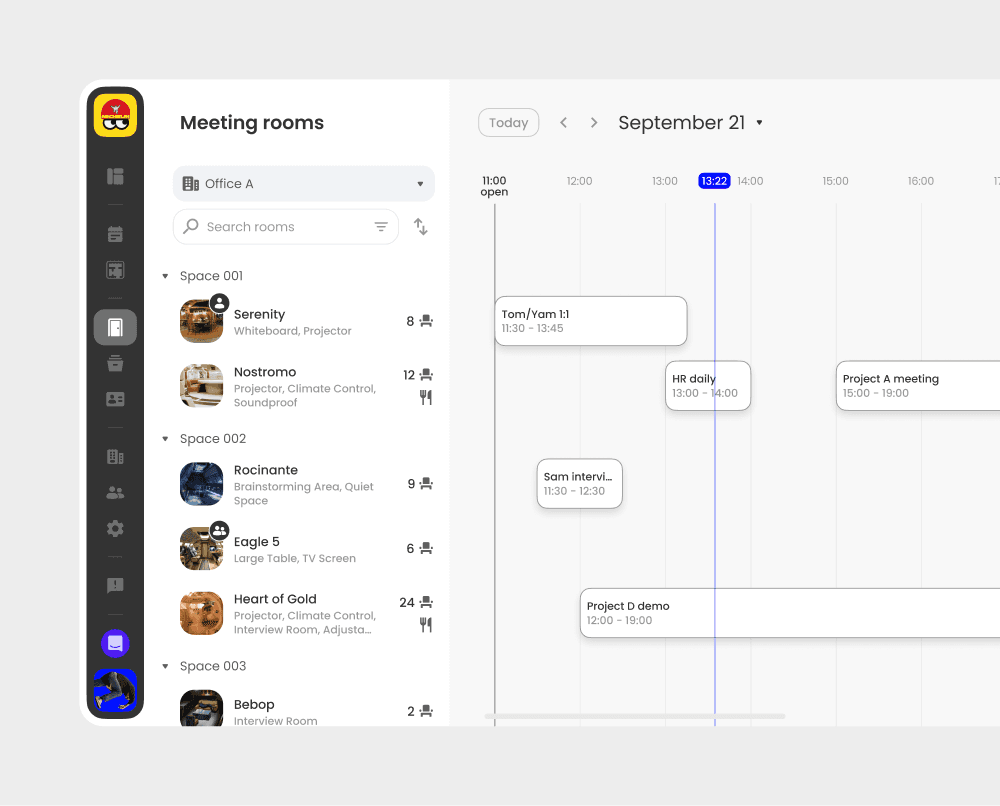
Best for: Mid-sized European companies with 500–10,000 employees running Microsoft 365 that need a compliance-ready, fully integrated room booking platform without dedicated IT overhead.
Why it stands out:
All-in-one workplace platform that offers desk booking, visitor management, resource and parking booking – all integrated with room booking.
Yoffix is a native Microsoft 365 application that lives inside Teams and Outlook.
Employees can book via a dedicated Outlook add-in with bi-directional real-time sync, or directly in Teams. It also integrates with Google Workspace and Slack.
Room filtering by size, amenities, equipment, and location is built in, with floor plan views and room photos included.
Catering, equipment requests, seating arrangements, visitor invitations, and cost center allocation can all be added at the point of booking. FM teams get a consolidated view of all service requests in one place.
Check-in with auto-release prevents ghost bookings across multiple check-in methods: Teams app, QR code, room display, or NFC chip.
Booking rules, approval flows, buffer times, and permission controls are fully configurable.
Utilization analytics are included from the Business plan.
The AI layer surfaces suggestions on room resizing, scheduling inefficiencies, and underused spaces.
Yoffix offers room displays in two form factors: Android panels with LED status bar and NFC, and a wireless e-ink display with no cabling required. Any smart TV can also show live availability via digital signage. It is also compatible with Microsoft-based products such as Yealink, Logitech, etc.
Yoffix is hosted in Germany, ISO 27001:2022 certified, and includes anonymous mode on all plans.
Limitations:
Full multi-tenancy requires the Enterprise plan
Room display hardware is a separate cost
Teams-native advantage is less relevant for Google Workspace organizations
Pricing: Standalone room booking from €10/room/month (Business), €15/room/month (Pro). Full platform from €1.5/user/month (Business, includes 3 rooms).
2. Joan
Best for: Offices where the physical meeting room experience is a primary selection criterion.
Why it stands out: Joan is most known for its e-ink room displays. The software platform though offers a narrower range of features than many counterparts. Check-in and auto-release are supported. Calendar integration covers Outlook and Google Calendar. Utilization reporting covers room usage rates, meeting patterns, and no-shows. Multi-site is supported.
Limitations:
No Outlook add-in confirmed
Booking rules, approval flows, and booking window configuration are not confirmed in publicly available documentation
Catering and service requests are not supported
No AI features confirmed
Bundled pricing model: the full platform fee applies regardless of which features are used, with no modular option
Pricing: Upon request (from €49/month for software, scaling by users and devices).
3. Condeco / Eptura
Best for: Large enterprises (5,000+ employees) with dedicated corporate real estate and facilities management teams that need to manage complex multi-site operations and integrate with building access systems.
Why it stands out: Condeco, now Eptura Engage, is an enterprise-grade platform. It connects workplace reservations with facilities management, visitor handling, and building access control. Multi-site and multi-building administration is a core strength. Approval workflows, booking policies, and admin controls designed for organizations managing complex space across many locations.
Limitations:
Complex configuration requires IT and facilities management expertise
Implementation timelines typically run 3 to 6 months or longer
Pricing reflects enterprise positioning and is not suitable for most mid-sized organizations
Requires a dedicated real estate or facilities team to own the platform ongoing
No EU data residency explicitly offered.
Pricing: Contact vendor for quote.
4. Skedda
Best for: Co-working space operators and organizations that manage externally bookable spaces where the booking system serves both internal staff and external clients or members.
Why it stands out: Skedda offers booking rules and role-based access. Two-way sync with Microsoft 365 and Google Calendar is included. Check-in via email, app, or QR code is supported. Workplace Intelligence analytics provide utilization data.
Limitations:
Not optimized for Teams-native booking workflows
No Outlook add-in confirmed
No AI features confirmed
Designed primarily for venue and co-working operations; admin depth for complex corporate booking policies is less developed than enterprise tools
Works council compliance features not mentioned
Not optimized for Teams-native booking workflows
No EU data residency explicitly offered.
Pricing: Per space model. From $99/month for 15 spaces.
5. Robin
Best for: Organizations where dedicated workplace operations teams manage the platform.
Why it stands out: Robin offers analytics capabilities, check-in via mobile app, network presence, and occupancy sensor integration. Role-based permissions control access at building and floor level. Microsoft, Google, and Slack integrations are all supported.
Limitations:
Booking window, buffer time, and approval flow features not explicitly documented in publicly available product pages
Booking rules, approval flows, buffer times, and booking window configuration are not explicitly documented in publicly available product pages
EU data residency is available but data may be accessed internationally
Custom pricing only, no publicly available rates, annual billing required
Pricing: Contact vendor for quote.
6. anny
Best for: Organizations that need to manage internal meeting rooms alongside externally bookable spaces such as events, co-working areas, community resources, within a single platform.
Why it stands out: anny handles internal corporate bookings and external-facing reservations in the same system, with customizable permits, quotas, and booking rules at a granular level. Multi-site support is available for organizations that need enterprise system connectivity. Per-resource pricing means unlimited users can book without per-seat licence costs.
Limitations:
M365 integration is less deep than Teams-native tools; calendar sync is available but native Teams booking is not confirmed
No AI features confirmed
The platform's breadth (events, ticketing, membership management) adds complexity for organizations only needing straightforward internal room booking
Pricing: Resource-based. From € 5/resource/month.
7. desk.ly
Best for: Small companies that want a fast, low-friction deployment.
Why it stands out: desk.ly is positioned around simplicity and speed of deployment, with a stated "no training required" approach. It is hosted in Germany, ISO 27001 certified, and provides data processing agreements. Room booking includes catering support.Calendar sync covers Outlook and Google Calendar. User groups and booking rules are available for basic admin control.
Limitations:
No check-in and auto-release confirmed, which means ghost bookings are not automatically resolved
Booking rules and approval workflows are not confirmed
Analytics depth is more limited than most tools in this comparison
No AI features confirmed
Multi-site support not well-documented for complex scenarios
Pricing: User-based. From €1.65/user/month.
The DACH-Ready Room Booking Platform: Why Yoffix Covers Every Criterion on This List
Working through the ten criteria in this guide, Yoffix is the only tool that covers all of them without requiring a compromise or an enterprise-scale commitment. German hosting and ISO 27001:2022 are in place with a Trust Center for DPA documentation. The Teams and Outlook integration is genuinely native. Check-in enforcement, room filtering, utilization analytics, admin booking controls, and multi-site support are all included. Pricing is modular, starting with room booking at €10 per room per month, which makes the first purchase straightforward and avoids paying for unused functionality.
For the two criteria that most often slow down DACH procurement (data residency and works council readiness) German hosting addresses the first, and the platform's ability to scope data and reporting should be part of the initial vendor conversation on the second. That combination of compliance readiness, native Microsoft 365 integration, and modular commercial structure is what sets Yoffix apart for this specific market.


