How to Coordinate Office Days with Favorite Colleagues
At a glance
This tutorial explains how to use the Favorite Colleagues feature in Yoffix to coordinate office attendance more effectively.
Why Use Favorite Colleagues?
While you can filter colleagues by team or department, organizational structures do not always reflect your preferred collaboration circle. You may want to coordinate office days with specific individuals across different teams.
The Favorite Colleagues feature allows you to prioritize the people you want to see most in the office.
How to Mark a Colleague as Favorite
Go to All Colleagues or your attendance overview.
Find the colleague you want to prioritize.
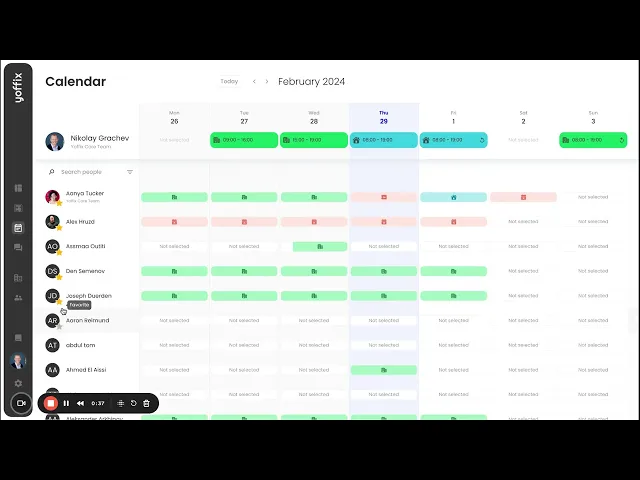
Click the ⭐ icon next to their name.
The colleague is now marked as a favorite.
What Happens Next?
Your favorite colleagues appear at the top of your list.
Their office schedules are immediately visible.
You can quickly see when they are on site.
You can remove a colleague from your favorites at any time by clicking the star again.
Plan Office Days More Effectively
With Favorite Colleagues, you can:
Coordinate in-office days with selected colleagues
Increase collaboration across departments
Avoid unplanned solo office days
Align social and work interactions more intentionally
This feature helps you create more meaningful and productive office days in a hybrid work environment.